
A prospective client messages a dental clinic at 10:45 PM: "Do you have availability for a cleaning tomorrow afternoon?" If nobody answers until 9:00 AM, there is a real chance they have already booked somewhere else.
For appointment-based businesses such as clinics, salons, spas, barbershops and consultancies, enquiries often arrive after hours or while the practitioner has their hands full. In many markets across Europe, Latin America, the Middle East and Africa, WhatsApp is where those conversations already happen.
At Patofy we built an AI receptionist that runs on a business's own WhatsApp number as the first pillar of the Four R's framework: Reception, Reputation, Retention and Referrals. Getting a chatbot demo working takes an afternoon. Making it reliable enough to book real appointments is harder.
This post walks through the architecture: how messages enter the system, how fragmented texts are merged into one turn, how the agent gets customer context, how human handoff works, and the trade-offs we made along the way.
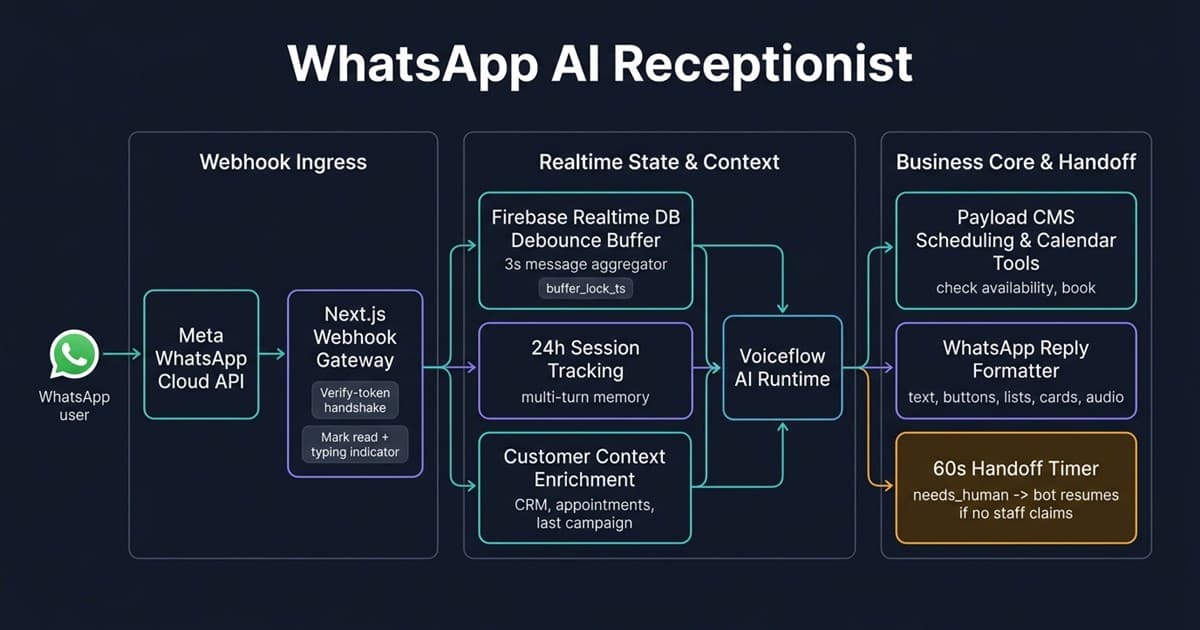
High-Level Architecture#
A production WhatsApp assistant can't just pipe raw message strings into a prompt. Customers send fragmented texts, voice notes, photos and button taps, and they expect the agent to know who they are and to hand over to a human when needed.
1. Webhook Ingress and the 24-Hour Window#
We use Meta's official WhatsApp Cloud API. Unofficial browser-automation tools break often and put a business's phone number at risk, so we avoided them from the start.
What the gateway does on every request#
- Verification handshake (
GET). When you register the webhook, Meta sends a challenge. The endpoint checks the verify token and echoes the challenge back. - Filter noise.
sent,deliveredandreadstatus callbacks arrive on the same endpoint. They're ignored so they never trigger an agent turn. - Resolve the tenant. The receiving phone number ID tells us which business the message belongs to. Everything downstream is scoped to that tenant.
- Sync the contact. The sender is matched to an existing contact (handling common phone-number formats) or created on the fly. We stamp their last-interaction time, and if the message came from a Click-to-WhatsApp ad, we store the ad attribution.
- Mark as read and show typing. The customer sees the native "typing…" indicator while we work.
Meta expects a quick success response and retries failed deliveries, so slow work must not hold the request open. Text messages return as soon as they are buffered (see section 2).
The 24-hour customer service window#
Meta lets you send free-form messages only within 24 hours of the customer's last message. After that, a business-initiated message must be an approved template, and a free-form attempt fails with error code 131047.
We track this in two places. A session record in the realtime store holds the last-activity time, and a new session starts after 24 hours of silence, which also starts a fresh conversation in the AI runtime. The contact's last-interaction time is what outbound campaigns use to choose between free-form text and a paid template. We cover that side in How to Revive Dormant Clients on WhatsApp.
2. Fragmented Messages: The Debounce Buffer#
People rarely send one tidy paragraph:
10:45:01: "Hi there" 10:45:03: "Do you do bridal hair?" 10:45:06: "And what are your prices for Saturday afternoon?"
If each message starts its own agent turn, you get three competing executions on the same conversation, triple the model cost, and replies that answer the first message while the customer is already on the third.
Why the state lives in shared storage#
The buffer and its lock live in a shared realtime database, not in a variable inside one request handler. Concurrent webhooks for the same customer can land on different requests, and a shared record gives them a single source of truth. A "last writer wins" timestamp decides which request is allowed to run the turn:
// Conceptual debounce: shared buffer plus a "last writer wins" lock
const DEBOUNCE_MS = 3000

async function onTextMessage(tenantId: string, userId: string, text: string) {
  const session = store.ref(`sessions/${tenantId}/${userId}`)
  const myStamp = Date.now()

  // 1. Append the fragment and stamp the lock in shared storage
  await Promise.all([
    session.child('buffer').push(text),
    session.update({ status: 'buffering', lockTs: myStamp }),
  ])

  // 2. Wake up after the quiet period
  setTimeout(async () => {
    const state = (await session.once('value')).val()
    if (!state || state.status !== 'buffering') return
    if (state.lockTs !== myStamp) return // a newer message owns this turn

    await session.update({ status: 'thinking', lockTs: null })
    const combined = Object.values(state.buffer ?? {}).join(' ')
    await session.child('buffer').remove()

    await runAgentTurn({ tenantId, userId, text: combined })
  }, DEBOUNCE_MS)
}
Only the timer created by the final message in a burst passes the stamp check. The three fragments above become one prompt: "Hi there Do you do bridal hair? And what are your prices for Saturday afternoon?"
Trade-offs worth knowing#
- The wake-up timer runs inside the server process. We run a long-lived Node server, so this works, but if the process restarts during the 3-second window, that buffered burst is not processed automatically.
- The stamp check isn't a database transaction. It's safe in practice because only the latest stamp can match, but a stricter design would use an atomic compare-and-set or a durable queue.
- Three seconds is a compromise. Shorter feels snappier but splits more bursts. Longer merges more but delays every reply.
3. Voice Notes, Images and Button Taps#
Not everything arrives as text.
- Voice notes. We download the audio with the tenant's Cloud API credentials and apply a size guard of about 5 MB, which corresponds to roughly two minutes of voice. If it's too long, the customer gets a polite message asking for a shorter note or text. Accepted audio is saved to private cloud storage, and the agent receives a time-limited signed URL as a file attachment. The original recording also shows up in the staff inbox, so a human can listen to exactly what the client said.
- Images and documents. They follow the same path: download, store privately, pass as an attachment, with the caption as the message text.
- Button and list taps. When a customer taps an option, we pass the selected option's title to the agent as if they had typed it.
4. Context Enrichment and Memory#
A generic chatbot answers every message like a stranger. A good receptionist knows who you are and what you last booked. Before each turn, the backend assembles context for the agent:
| Context passed to the agent | Why it matters |
|---|---|
| Customer first name and tags | Personal greetings; new vs. returning handling |
| Loyalty points balance | Answer reward questions accurately |
| Open lead details | Continue an enquiry instead of restarting it |
| Past visit summary (total visits, last visit, favourite service) | "Same as last time?" works naturally |
| Upcoming appointments (next three) | Reschedule or cancel the right booking |
| Referral code status | Answer referral questions with real rewards |
| Business timezone, operating hours and current date/time | Correct availability and "tomorrow" |
| Recent WhatsApp conversation history | Multi-turn memory across messages |
| Last outbound message: type, text and how long ago | Understand replies to campaigns |
| Ad attribution (if from a Click-to-WhatsApp ad) | Know which ad drove the conversation |
The outbound loop#
Suppose the retention engine sent a win-back message: "Hi Sarah! It's been 6 weeks since your last facial with Dr. Maria." When Sarah replies "Can I do Friday at 2pm?", the agent can see the exact message that was sent and when. It doesn't greet her as a stranger. It continues the conversation: it checks Dr. Maria's availability for Friday and offers real slots.
5. The Fail-Safe Human Handoff#
No matter how good the prompt is, some conversations need a person: clinical questions, billing disputes, or a customer who simply asks for a human.
Three conversation states#
bot_active: the AI answers questions and books appointments.needs_human: the AI asked for a person and stopped replying.human_active: a staff member claimed the chat. The bot stays silent.
While a chat is needs_human or human_active, incoming messages are still recorded in the inbox, but the agent does not respond.
The unanswered handoff problem#
What happens when someone asks for a human at 11:30 PM, the bot goes quiet and nobody is awake? The customer is left staring at a silent chat. To prevent this, entering needs_human starts a 60-second timer:
// Conceptual handoff recovery timer
const HANDOFF_TIMEOUT_MS = 60_000
const timers = new Map<string, NodeJS.Timeout>()

export function startHandoffTimer(tenantId: string, chatId: string) {
  clearHandoffTimer(chatId)
  timers.set(chatId, setTimeout(() => onTimeout(tenantId, chatId), HANDOFF_TIMEOUT_MS))
}

export function clearHandoffTimer(chatId: string) { // called when staff claims the chat
  const t = timers.get(chatId)
  if (t) { clearTimeout(t); timers.delete(chatId) }
}

async function onTimeout(tenantId: string, chatId: string) {
  timers.delete(chatId)
  const chat = await getChat(tenantId, chatId)
  if (chat?.status !== 'needs_human') return // staff already claimed it

  await setChatStatus(tenantId, chatId, 'bot_active')
  // Let the agent apologise and offer what it can still do
  const reply = await triggerAgentFallback(tenantId, chatId, { staffAvailable: false })
  if (reply) await sendWhatsAppText(chatId, reply)
}
If no one claims the chat within a minute, the status goes back to bot_active and the agent sends a short message acknowledging that the team is busy, then offers what it can still do: check availability, answer questions, or take a message for follow-up. The exact wording comes from the agent's own flow, so each business can tune it.
The same caveat applies here as with the debounce timer: it lives in the server process, so a restart drops pending timers. For a single long-running server that's acceptable, and a durable job queue would be the next step.
6. Translating Agent Output into WhatsApp Messages#
The AI runtime returns generic "traces": text, choices, cards, audio. WhatsApp has its own strict message formats, so a formatter translates each trace:
| Runtime output | WhatsApp message | Meta's constraint |
|---|---|---|
| Text | Text message | Up to 4,096 characters |
| 3 or fewer choices | Reply buttons | Max 3 buttons, titles up to 20 characters |
| 4 or more choices | List picker | Max 10 rows |
| Card or carousel | Image with caption and optional buttons | One message per card |
| Audio | Audio message | Hosted file URL |
If a service menu has two options, the customer sees tappable buttons. If it has six, they get a list picker. We also drop consecutive identical text messages so a repeated trace doesn't send the same reply twice.
7. Operational Guards#
A few safeguards sit around the agent so it can't cause trouble:
- Locked subscriptions. If a tenant's subscription is locked, the customer gets a short "front desk temporarily unavailable, please contact us directly" message instead of silence.
- Metering and latency tracking. Each AI response is counted against the tenant's allowance, and response latency is tracked, which helps us spot slow turns. For a deeper look at the metering problem in a sister product, see Preventing Runaway LLM Costs with Atomic Credit Metering.
- Tool-based scheduling. The agent never computes calendar availability itself. It calls a scheduling tool and reports back what the system returns (more below).
Production Lessons and What We'd Harden Next#
1. Never let the model do calendar math#
Don't pass raw calendar data to an LLM and ask "Is 3 PM Tuesday free?" Timezones, daylight saving, buffers and double bookings produce confident but wrong answers. The model should call an availability tool, which applies the business's rules (including a minimum lead time before a booking), and relay the result.
2. Respect the 24-hour window everywhere#
Anything outside the window, such as reminders, review requests and win-back messages, needs an approved template. Build this rule into the sender, not into each feature.
3. Verify webhook signatures#
Meta signs webhook payloads with an X-Hub-Signature-256 header. Verify it on every POST before trusting the body. It is cheap protection against forged requests.
4. Make handlers idempotent#
Meta retries deliveries. Dedupe on the message ID so a retry never triggers a second reply or a double booking.
5. Keep slow work off the request path#
Text messages return immediately because the heavy work is deferred. Media and button replies do more work inline, and routing those through the same buffered or queued path is on our list, since it keeps the response fast when downloads are slow.
6. Test the languages your clients actually use#
Language handling comes from the underlying model rather than static translation files, which makes it flexible, but quality varies by language. Test the languages your own customers speak, and review real conversations regularly.
What's Next#
The receptionist is just one pillar. These related posts go deeper:
- 👉 Ditching Vercel for a $15 Hetzner Server with Dokploy
- 👉 Preventing Runaway LLM Costs with Atomic Credit Metering
- 👉 Engineering Sub-10-Second Tactical AI on WhatsApp
- 👉 Behind the Multi-Agent Architecture of Panda FPL
- 👉 How to Revive Dormant Clients on WhatsApp
Want to see how Patofy can run your business's front desk on WhatsApp? Explore the Patofy platform, see the pricing and ROI calculator, or read the full Patofy engineering case study.
Building production AI agents, WhatsApp integrations or multi-tenant SaaS? Let's talk about your architecture.