Picture a salon, dental clinic, auto detailing studio, or spa with 900 client records. On a quiet Tuesday, two chairs or service bays are empty, and the owner is deciding whether to spend another few hundred dollars on Instagram or TikTok ads.
Meanwhile, hundreds of people in that client list have already visited, paid, and been happy enough to stay on the books. They simply never came back. Nobody did anything wrong—life got busy, the next appointment never got scheduled, and the business never followed up.
Reviving dormant clients is almost always cheaper than finding new ones. And if your clients already talk to you on WhatsApp, it is by far the easiest place to bring them back.
This guide covers how to win back inactive clients on WhatsApp without sounding pushy: when to reach out for your specific industry, word-for-word message templates, what WhatsApp actually charges, and how to measure the revenue that comes back.
What Is a Dormant Client?#
A dormant client is someone who has used your service before but has not booked within the time you would normally expect them back. That window is different for every industry:
| Service Type | Typical Return Cycle | A Sensible "Dormant" Trigger |
|---|---|---|
| Barbershop, nails, lash fills | 2 – 4 weeks | 21 – 30 days |
| Hair colour, braids, protective styles | 5 – 8 weeks | 45 – 60 days |
| Auto detailing, tinting & car care | 6 – 10 weeks | 60 – 75 days |
| Facials, massage, physiotherapy, skin care | 6 – 12 weeks | 60 – 90 days |
| Dental check-ups, optical, injectables | 4 – 6 months | 120 – 180 days |
Use these intervals as a starting point and adjust them to your own booking history. There is no universal "30/60/90-day" rule: a 21-day trigger is right for a barbershop and far too early for a dentist.
Why Win-Backs Beat Paying for New Ads#
New leads from paid ads are expensive and uncertain. Past clients are warm: they already know your location, your staff, your prices, and your quality.
| Comparison Metric | New Client from Paid Ads | Returning Past Client |
|---|---|---|
| Acquisition Cost | Ad spend + creative time + lead chasing | Close to zero (pennies per message) |
| Trust Level | Starts cold; price-shops competitors | Already built from past visit |
| Likelihood to Book | Lower (typically 2% – 5% of clicks) | Typically much higher (10% – 20% of contacted list) |
| Likelihood to No-Show | Higher | Significantly lower |
Exact figures vary by industry and city, but the direction is consistent: a client who already trusts you is the cheapest, highest-margin booking you will ever get.
Why Email and Blast SMS Usually Fail#
Most businesses already try to stay in touch with past clients—it just doesn't work well on the wrong channel:
- Email newsletters: Many land in the Promotions folder or never get opened. Even when someone reads one, they still have to click through to an external booking page and fill out a form.
- Bulk SMS discount blasts: One-way promotional texts feel impersonal, cannot be replied to directly in many regions, and teach clients to wait for a discount before booking.
- Phone calls: Your front desk is already busy with walk-ins, and most people don't answer voice calls from unknown business numbers.
WhatsApp works better for a simple reason: your clients are already there. Messages are read quickly, replies take seconds, and booking is a conversation instead of a form. Across Kenya, Nigeria, South Africa, Europe, Latin America, and the Middle East, WhatsApp is already how clients ask questions and book appointments.
The Four Rules of a Win-Back Message That Doesn't Feel Pushy#
WhatsApp is a personal space. A badly handled campaign gets your number muted or blocked, and that can damage your business account quality rating. Follow these four rules:
1. Personal, short, and question-first#
Skip flyers and long promotions. Write like a helpful coordinator checking in, and end with an easy question.
Hair Salon / Beauty Parlour:
"Hi Amina, it's Grace from Sifmax Beauty Parlour. It's been about 6 weeks since your last colour and braids visit, so I wanted to check in. We have a couple of slots open this Saturday morning. Would that work for you?"
Dental Practice / Clinic:
"Hi Daniel, this is Dr. Wanjiru's team at Bright Smile Dental. It's been around 6 months since your last cleaning. Would you like us to find you a time next week?"
Spa / Wellness Studio:
"Hi Fatima! It's been about 2 months since your last facial at Serene Spa. How has your skin been feeling? We'd love to book your next session. Is mid-week or the weekend easier for you?"
Auto Detailing Studio:
"Hi David, it's Marcus from Apex Auto Detail. It's been about 2 months since your last interior detail. Would you like to bring the car in for a refresh this Thursday or Friday?"
2. Match the timing to the service#
Contact people when they are actually due, not on a fixed calendar date for everyone. A 21-day message to a dental patient is noise, and a 6-month message to a barbershop client is far too late.
3. Contact each person once per campaign#
If someone doesn't reply, don't chase them. Follow-up nudges feel desperate and drive people to block you. One warm message leaves the door open without pressure.
4. Check that they haven't already booked#
Nothing looks worse than sending "We miss you!" to someone who is already booked for Friday afternoon. Whatever tool you use, make sure it automatically skips clients who already have an upcoming appointment on the calendar.
What Happens When the Client Replies? (Closing the Booking Fast)#
Sending the check-in message is only half the battle. The main reason manual win-back campaigns lose money is slow replies.
If Amina replies "Saturday morning works!" at 8:30 PM, and your front desk doesn't answer until 11:00 AM the next day, her plans have often changed.
Here is how a smooth WhatsApp win-back conversation locks in the booking immediately:
- Business (Tuesday, 2:00 PM): "Hi Amina, it's Grace from Sifmax. It's been 6 weeks since your last visit—we have slots open this Saturday morning. Would that work for you?"
- Client (Tuesday, 2:12 PM): "Hey! Yes please, do you have 10am or 11am?"
- AI Receptionist / Front Desk (Tuesday, 2:12 PM): "10:00 AM this Saturday is open with Sarah! I've locked that in for you. You'll receive a reminder on Friday—see you Saturday!"
Zero external links, zero forms, and a confirmed appointment in under a minute.
The Cost: What WhatsApp Actually Charges#
Be realistic about messaging costs before you start:
- Outside the 24-Hour Window (Approved Templates): WhatsApp's rules require that when you start a conversation with a client more than 24 hours after their last message, you must use a pre-approved message template. Meta bills a small per-message fee for these business-initiated messages, varying by country.
- Inside the 24-Hour Window (Free-Form Messages): If a client has messaged you within the last 24 hours—or the moment they reply to your win-back template—you can converse with free-form text at no additional Meta template fee.
The template fee (typically a few cents) is tiny compared with the value of one rebooked appointment, but you should still segment your list rather than blasting every contact at once.
How to Run a Win-Back Campaign Step by Step#
- Pull your inactive list: Filter your clients by last visit date—for example, everyone who has not visited in 60 to 120 days.
- Segment by service: Group clients by what they usually book (hair, skin, dental, detailing) so each group gets the right timing and wording.
- Prioritize your regulars first: Regulars who stopped coming are your warmest opportunity; first-time visitors who never returned come next.
- Get a template approved: Create a short, personal template with the client's first name as a variable. Meta must approve it before you can use it for business-initiated outreach.
- Send in small daily batches: Don't message 400 people at the exact same minute. Pacing 20 to 30 messages a day ensures replies are handled quickly and protects your WhatsApp account quality rating.
- Reply fast: When a client says "Yes, Saturday works," book them within minutes so they don't drift away again.
- Measure the return: Count how many messages you sent, how many people replied, how many booked, and how much revenue came back.
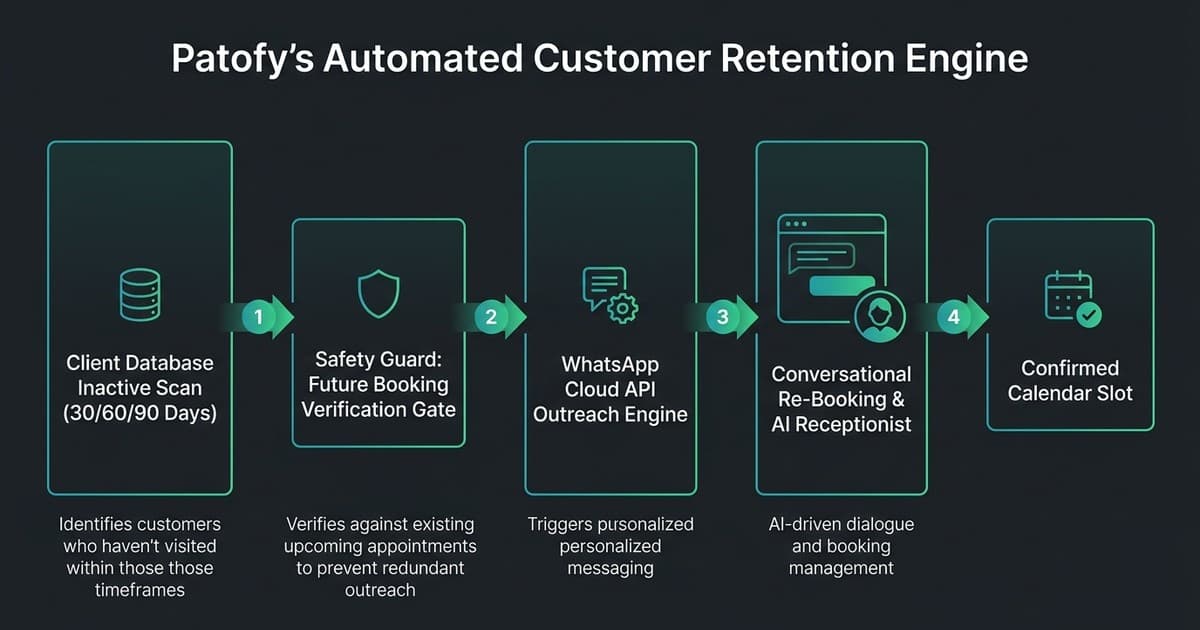
How This Works Automatically in Patofy#
Doing this by hand works for a week, then falls apart when the front desk gets busy. Patofy automates the repetitive parts for WhatsApp-based service businesses:
- Any inactivity period you want: Enter the exact number of days that fits your service (21 days, 45 days, 180 days—you are never locked into rigid 30/60/90 presets).
- Automatic client tagging: Aim a rule at a specific service tag, or target First-Time vs. Returning clients automatically as their appointments are completed.
- Live template preview: Personalize your approved WhatsApp template with the client's first name and preview it live before activating the campaign.
- Automatic daily scanning & paced batches: Patofy checks your client records daily for people who just crossed your inactivity threshold and spaces messages out in manageable batches.
- Upcoming booking & single-touch guards: Clients who already have a future appointment booked are skipped automatically, and each client is only contacted once per campaign rule.
- Cost-aware sending: If a client happens to be inside an active 24-hour conversation window, Patofy sends free-form text instead of a paid template.
- Instant booking via your AI Receptionist: Because the same WhatsApp number also runs your 24/7 AI Receptionist, a client who replies "Yes please" at 10 PM is booked into your calendar immediately without waiting for staff.
- 14-day revenue attribution: If a contacted client books within 14 days, the appointment and its revenue are automatically credited to your campaign dashboard.
What Results Can You Realistically Expect?#
Results depend on your client base, your service cycle, and how quickly you respond. Here is a conservative example to help you estimate your own potential.
Say a salon, clinic, or studio has 450 clients who haven't visited in 60+ days, and an average visit is worth $60 (or KES 4,500):
| Campaign Assumption | Conservative Example Value |
|---|---|
| Dormant clients contacted | 450 past clients |
| Clients who reply (20% response rate) | 90 people |
| Clients who book (10% of those contacted) | 45 confirmed appointments |
| Revenue recovered ($60 average visit) | ~$2,700 recovered |
| Revenue recovered (KES 4,500 average visit) | ~KES 202,500 recovered |
That initial wave recovers revenue sitting idle in your backlog. Afterwards, the ongoing benefit is steady: every week, clients who newly cross your inactivity threshold receive a friendly check-in instead of quietly disappearing.
Frequently Asked Questions#
Is it allowed to message past clients on WhatsApp?#
Yes, provided they have previously contacted you or given you their phone number as a customer and you follow WhatsApp's business messaging policy: use approved templates for business-initiated messages outside the 24-hour window, honor opt-outs immediately, and keep outreach relevant to their service.
How often should I message dormant clients?#
Once per campaign is the best rule. If someone doesn't answer, give them space. You can run a different seasonal campaign months later, but avoid repeated "just checking in" nudges.
What should I offer in a win-back message?#
Often nothing at all. A friendly check-in offering two easy times to book works remarkably well for regular clients. Reserve a small perk or add-on for clients who have been gone 6+ months so you don't train regulars to wait for discounts.
How long should I wait before calling a client dormant?#
Look at how often your regular clients normally return, then add a 1- to 2-week grace period. Barbershops and nail studios typically use 3 to 4 weeks, hair salons 6 to 8 weeks, and dental practices 5 to 6 months.
Can I do this without software?#
Yes, for a small list. Have your front desk message 5 to 10 past clients each day from your business WhatsApp. Once your client list passes a few hundred records, automation ensures nobody slips through the cracks and prevents accidentally messaging clients who already booked.
Related Guides & Patofy Deep Dives#
- 👉 Pillar 1 (24/7 Front Desk): Architecting a WhatsApp AI Receptionist: Multi-Turn Memory, 24hr Conversation Windows, and Fail-Safe Human Handoff
- 👉 Pillar 2 (Reviews & Social Proof): How We Built an Automated WhatsApp Reputation Engine
- 👉 Platform Infrastructure: Ditching Vercel for a $15 Hetzner Server with Dokploy
- 👉 Case Study: Patofy Engineering & Product Architecture Case Study
- 🔗 See how Patofy's four pillars (Reception, Reputation, Retention, and Referrals) fit together at patofy.com/how-it-works
Running an appointment-based business and want to see how many dormant clients you could win back on WhatsApp? Reach out at jackmkimbo.com/#contact or explore Patofy.